Tuesday, 11 March 2025


Exciting New Features in Oracle Cloud Financials – 25A πŸš€

Oracle continues to enhance Cloud Financials with new capabilities that drive automation, efficiency, and real-time insights. The latest update introduces powerful features designed to streamline financial operations and improve decision-making. Let’s take a look at some key highlights!

πŸ”Ή 1. AI-Powered Invoice Processing

Oracle has introduced enhanced AI and Machine Learning capabilities to automate invoice processing. The system can now:
✅ Auto-capture invoice details from attachments.
✅ Suggest account coding based on past transactions.
✅ Reduce manual intervention, leading to faster approvals.

πŸ”Ή 2. Advanced Reconciliation Dashboard

Finance teams can now enjoy a comprehensive reconciliation dashboard with:
✅ Real-time tracking of unmatched transactions.
✅ Automated variance analysis for quicker resolution.
✅ Integration with cash management for improved accuracy.

πŸ”Ή 3. Enhanced Budgetary Controls & Forecasting

This update brings:
Predictive forecasting using historical financial data.
✅ Real-time budget tracking with alerts for spending deviations.
✅ Integration with Oracle EPM for unified financial planning.

πŸ”Ή 4. Self-Service Reporting & Analytics

Finance users can now create custom reports without IT involvement! Features include:
Drag-and-drop report builder with OTBI enhancements.
✅ Improved BI Publisher templates for automated financial statements.
✅ New visualization tools for real-time business insights.

πŸ”Ή 5. Automated Tax Compliance & Global Reporting

To support compliance, Oracle has added:
✅ AI-driven tax validation and compliance checks.
✅ Real-time GST/VAT calculations for global entities.
✅ Enhanced country-specific regulatory reporting templates.


Tuesday, 22 October 2024

Oracle Financial Update - 24D


 πŸš€ Exciting News for Oracle Financials Users! πŸš€

Oracle Cloud Update 24D introduces a powerful enhancement to Segment Value Security in Oracle Financials. This feature gives organizations even greater control over their financial data by allowing refined access management based on segment values module wise. With this update, you can now:

πŸ” Ensure tighter control over sensitive financial information module wise.
πŸ“Š Restrict access to specific chart of account segment values, enhancing security and compliance.
πŸ” Simplify auditing and reporting processes by enforcing access rules at a granular level.
πŸ› ️ Improve operational efficiency by ensuring users only see the data relevant to their roles.

This update will help organizations enforce stronger financial controls while maintaining the flexibility to meet complex business needs. πŸ’ΌπŸ’‘

Thursday, 13 June 2024


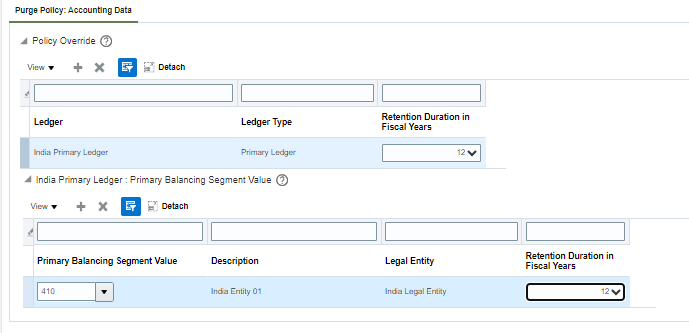
General Ledger 24B: Accounting Data Archive and Purge


1. Setup and Maintenance - Manage Archive and Purge Policies


2. Select archive and purge years


3. Prepare the business objects


4. Scheduled process kicks in and starts preparing the business object.


5. Once succeeded, select the ledger, BSV and retention years.


6. Click on Enable once your object is prepared.


Wednesday, 20 March 2024

 BILL MANAGEMENT

It's a self-service approach that reduces customer inquiries and also reduces the tasks that the organization does of reminder customer to pay bills, print & mail bills, identify their outstanding transactions. 


Using this functionality just needs to register your customers as external users, customers will also be able to make online payments, print transactions, dispute transactions (if authorized)


Sample screenshot:


Thursday, 1 February 2024

 AUTOMATED DISTRIBUTION CREATION USING A TRANSACTION ACCOUNT DEFINITION

Use a transaction account definition to simplify invoice account defaulting. Configure a set of rules in Transaction Account Builder to derive an account combination based on designated attributes.

A transaction account definition eliminates these manual activities:

  • Providing the account combination during invoice creation process
  • Providing account combination details through the account coding workflow process
  • Reviewing the account combination details during the invoice approval workflow process.

Friday, 8 December 2023

Oracle Business Intelligence Cloud Connector (BICC)

 The Oracle Business Intelligence Cloud Connector (BICC) is a cutting-edge technology that seamlessly bridges the gap between Oracle Cloud applications and Business Intelligence solutions.

It enables effortless extraction, transformation, and loading (ETL) of data from various sources into Oracle Analytics Cloud, facilitating robust analytics and reporting.

BICC empowers businesses by providing a unified platform to effortlessly integrate and analyze data, driving informed decision-making and unlocking deeper insights across the organization.

Some quick steps:

  1. Access and Setup: Gain access to Oracle BICC within your Oracle Cloud environment. Configure necessary permissions and roles for users.


  2. Data Source Configuration: Define and configure the data sources you want to connect to. This involves specifying connections to various databases, applications, or files where your data resides.


  3. Data Extraction: Use BICC to extract data from your configured sources. This could involve creating data sets or defining specific queries to retrieve the required information.


  4. Transformation and Modeling: Transform the extracted data as needed. This might include data cleansing, transformations, defining hierarchies, or creating specific data models for analysis.


  5. Data Loading: Load the transformed data into Oracle Analytics Cloud or other reporting and analytics tools for visualization, analysis, and reporting purposes.


  6. Monitoring and Maintenance: Regularly monitor the data extraction, transformation, and loading processes for any issues or errors. Maintain the connections, data models, and configurations as per evolving business needs.

Monday, 18 September 2023

Asset Important Lookups

 ORA_FA_ALLOW_GROUP - TO allow group depreciations and specify asset books.


ORA_FA_ALLOW_REVAL - To allow asset revaluations and specify asset books.


ORA_FA_ALLOW_CAP - for capitalization thresholds and specify asset books.


Thursday, 15 June 2023


Intelligent Account Combination Defaulting for Invoices


 Experience intelligent defaulting of accounting information for no-PO invoice lines. This feature uses Al and machine learning algorithms to predict and default segment values of the account code combination on accounts payable invoice lines. AI and machine learning use the historic data patterns and the specific influencing factors for each segment to predict their value.


When the user places the cursor on the distribution combination field for an unmatched invoice line, the segment values are defaulted if the prediction for the segment exceeds the dynamically calculated confidence score threshold. Once any segment values are defaulted, the distribution combination field is highlighted for user review. If a segment is not defaulted, or an incorrect segment is defaulted, the user can enter the relevant value for the missing segment or correct the incorrect defaulted segment value. The Al and machine learning algorithms learn from these edits and use the information to improve the prediction accuracy.


Intelligent Account Combination Defaulting For Invoices


Step by Step guide below


LETS CREATE AND ADD ROLES NEEDED FOR THE ABOVE FEATURE TO WORK.


 To use the above AI feature, pls create a role for business intelligence.

Go to – Tools – Security Console – Roles – Create Role


Fill in below information and click next 3 times to reach Role Hierarchy tab.


Search and add below mentioned 3 role hierarchies to this role.


Add this new role created to the user you are logged in or the user who has Applicaton Implementation Consultant as a role associated.


Run ESS job – Import User and Role Application Security Data


NOW, LETS CONNECT TO THE AI APPS AND ESTABLISH A CONNECTION BETWEEN AI APPS AND ORACLE ERP.


 Go to Tools – AI Apps Administration


 AI APPS Connected, below you can see status as ‘Active’ as I already connected. But you will get status as ‘Processing’ initially and after the connection is made the status changes to ‘Active’.


Click on ‘AI Apps for ERP’ and enter details to establish connection.


Enter details to establish a connection. It usually takes 3-4hrs for your AI model to get trained depending on the data you have in your instance.

Once the model is trained, you will get as below – ‘Trained’.


Once you get this status, pls download the report as you will get your promotion code to activate this offering in that report along with the accuracy of alogorithms to get your code combination defaulted.


NOW, LETS ADD THE PROMOTION CODE TO ACTIVATE THE SERVICES ON OUR INSTANCE.

Go to My Enterprise – Enterprise


Click on ‘Manage Promotion Codes’ to enter the promotion code for this particular AI service.


NOW, LETS OPT-IN FOR THE FEATURE FROM OFFERING OPT-IN FEATURE.


2.     
Go to ‘Setup and Maintenance’


3.      Under financials offerings select ‘Change Feature Opt In’


4.     
Click on pencil shaped icon to edit the feature for Payables.


5.     
Select feature – ‘Intelligent Account Combination Defaulting for Invoices’


Wednesday, 7 September 2022

  Translation and Remeasurement


Lets discuss translation and remeasurement in simple words


Translation - Converting foreign currency balances of your subsdiary into functional currency of your parent entity.

It is when company is doing investing activities.

It is foreign currency into functional currency.

Remeasurement - Converting financial numbers or accounting into functional currency to calculate the actual net income.

It is when company is doing operating activities.

It is accounting into functional currency. 

Wednesday, 3 August 2022

Useful Feature of Oracle Financials - Accounting Automation


Lets learn some quick key points of this feature


1. Accounting automation automatically runs your daily activities of accounting process.

2. Accounting automation takes out the exception errors.

3. Accounting automation sends the error exceptions directly to the concerned user.

How to enable it:
1. Go to setup and maintenance
2. Click on task and then on offerings
3. Select offerings - Financials

Wednesday, 6 July 2022

 Consolidation Concepts to be kept in mind


Things to keep in mind while doing consolidation


1. Elimination of intercompany entries -  Elimination of entries which are recorded within internal subsidiaries as we don't want to include them in our consolidation as we need to see the true picture of third party transactions.

2. Eliminate Minority Interest - Eliminating minority interest percentage value from the retained earnings account so that true picture of how much the company has the holding percent is shown in financial results.

Friday, 1 July 2022

 Earned and Unearned Discount in Receivables


Lets understand this in easy words


1. Earned Discount - Given to the customer if the payment is received before the payment term expiry. It is given according to the setup done.

2. Unearned Discount - Given to the customer after the payment terms expiry and if the discount is to be given intentionally over and above the invoice amount.

Tuesday, 21 June 2022

 Receivables - Invoicing rules and accounting rules


Lets learn some quick concepts of Invoicing rules and Accounting rules in Oracle Receivables


So, there are 2 rules  :

1. Invoicing rules - These are applied on the invoice header level. They are of 2 types - bills in arears and bills in advance. 

Bills in arears - Recognize the receivable at the end of the revenue recognition.
accounting entry - unbilled receivable Dr
                              Revenue Cr

                              Receivable Dr
                              unbilled receivable Cr

Bills in advance - Recognize the receivable at the start of the revenue recognition.
accounting entry - Receivable Dr
                               Unearned Revenue Cr
                               
                               Unearned revenue Cr
                               Revenue Dr

2. Accounting rules - Applied at the line level. Could be applied at each line separately. 

Types - Fixed, Variable, Duration, daily revenue all periods and daily revenue partial periods.


Tuesday, 14 June 2022

 Types of Pre-Payments


Lets understand in simple words the meaning and types of pre-payments


Pre-Payment - 

A payment that you make to the suppliers in anticipation of their goods and services. In other words its an advance payment to a supplier.

Types:

1. Temporary - 

For which you ought to receive an invoice in near future. For eg - Deposit to a hotel

2. Permanent - 

No invoices to be received in the future. For eg - lease deposit.

Tuesday, 7 June 2022

Adjustments in Fixed Assets

 Adjustments in Fixed Assets


Cost adjustment of a fixed asset


In this short article, I would quickly tell you the 2 types of adjustments in fixed asset module


1. Expense Adjustment - Prospective
2. Amortized Adjustment - Retrospective

Expense Adjustment - In simple words it is that adjustment which calculates the depreciation on the latest cost adjustment done by dividing it with the life of the asset.

Amortized Adjustment - In simple words it is that adjustment which calculates the depreciation by subtracting the depreciation till date from the new cost adjustment done.

Pre-requisites - Run the depreciation and close the period.

  Exciting New Features in Oracle Cloud Financials – 25A  πŸš€ Oracle continues to enhance Cloud Financials with new capabilities that drive...